Flagship
Autonomous AI organizations
Configure agents with roles, give them goals, and they run on cron schedules — opening tickets, delegating to each other, and submitting code or reports for your review. Real teamwork, no babysitting.
Local-first AI automation · Windows
Hire a team of AI agents — CEO, CTO, developers — that pick up work, talk to each other, and ship results on a schedule. Your data stays home. You bring your own Gemini key.
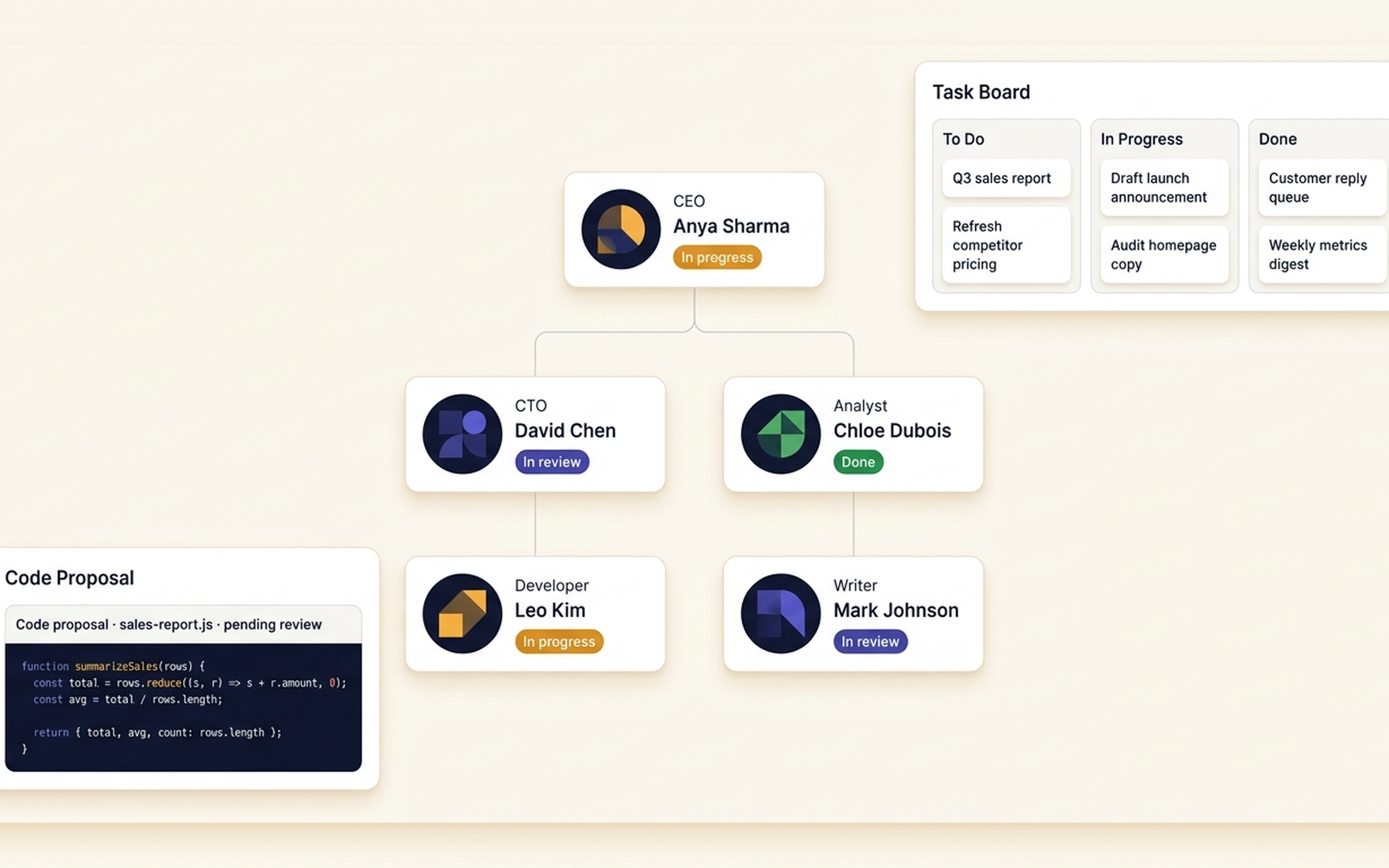
AutoPrise AI is a local-first AI automation platform for Windows. It lets you build autonomous AI organizations — teams of AI agents that pick up work, talk to each other, and ship results on a schedule. Everything runs on your own machine, with your own Google Gemini API key.
Company at a glance
AutoPrise AI is a closed-source paid software product built by an independent founder. Below: every load-bearing fact about the company, structured for fast verification.
Full company information at /company · Press kit at /press · Roadmap at /roadmap
Flagship
Configure agents with roles, give them goals, and they run on cron schedules — opening tickets, delegating to each other, and submitting code or reports for your review. Real teamwork, no babysitting.
Anywhere control
Talk to your PC from your phone. Hold-to-talk voice. Telegram bot for quick commands. A full mobile app with file browser, screen mirror, and live agent observation.
Real automation
Show AutoPrise AI a task once. It repeats it forever — clicking through web apps, filling forms, moving files, running commands. Confirmation gates and AI re-planning when something changes.
Privacy by design
AutoPrise AI runs on your machine. You bring your own Google Gemini API key — Google bills you directly. We never see your prompts, your files, or your sessions.
Or just want a personal assistant?
Most people don't need a full AI workforce on day one. They need one thing handled. AutoPrise AI works just as well as a single assistant that quietly gets through your list — on your PC, on your schedule.
Pull yesterday's sales from my dashboard and email me a one-paragraph summary at 8am.
Watch these competitor pricing pages and alert me the moment anything changes.
Read my inbox, draft replies to the easy ones, queue the rest for me to review.
Process this folder of invoices and enter them into my accounting tool.
Screenshot my homepage every morning and post it to a Slack channel.
Monitor my server logs and send me a daily digest of any errors.
One agent. Real tasks. Running on your PC, on your schedule.
Three steps from install to autonomous teamwork.
One installer. Sets up the local server, dashboard, and the supporting tools AutoPrise AI uses to drive your machine. No cloud account required.
Pick up a key from Google. Paste it into AutoPrise AI. You're billed by Google for AI usage at their cost. We never see your traffic.
Spin up an organization, assign roles, set the schedule, and walk away. Talk to it from your desktop, phone, or voice. It works while you sleep.
Founders, consultants, and operators who want to multiply their output without hiring. Run reports, monitor metrics, draft documents, manage inboxes — overnight, automatically.
Build coding agents that take tickets from a backlog, write code, open PRs for review. Extend the platform with plugins. Local execution means no source code leaves your machine.
Lawyers, finance, healthcare, anyone with sensitive workflows. AutoPrise AI never proxies your data. The AI runs through your own provider key. Audit logs stay on your disk.
AutoPrise AI is a local-first AI automation platform for Windows. It lets you build autonomous AI organizations — teams of AI agents that pick up work, talk to each other, and ship results on a schedule. Everything runs on your own machine, with your own Google Gemini API key.
Most AI apps are chat windows. AutoPrise AI is a workforce. Agents have roles (CEO, CTO, developer, analyst), they pick up tickets from a shared task board, they run on cron schedules without you opening the app, and they actually drive your PC — opening a browser, editing files, running commands, capturing screenshots. Chat is one of eight modes, not the only mode.
No. Most operators talk to AutoPrise AI in plain English — chat, voice, Telegram, or the mobile app. Coding agents are an option for technical teams; they're not a requirement. If you can describe what you want, AutoPrise AI can usually do it.
AutoPrise AI is the software. The intelligence comes from Google Gemini, which you provision directly. Google bills you for AI usage at their cost. We never see your prompts or your data. This keeps your costs predictable and your information private.
Windows 11 (and recent Windows 10 builds). The mobile companion app is available for Android. macOS and Linux are not on the near-term roadmap.
Yes. AutoPrise AI runs on your machine. Files, browser sessions, and chat history stay local. Mobile and remote access happen over your own private network — we don't host or proxy any of it.
AutoPrise AI is in pre-launch. Join the waitlist to be notified when public installation opens. The pricing model is a one-time perpetual license plus an optional annual support fee for ongoing updates. Specific numbers are announced at launch; waitlist members get founder pricing.
Early access
Get founder pricing and a heads-up the moment AutoPrise AI is available to install.
No spam. Confirmation comes from hello@autopriseai.com — check your Promotions tab if you don't see it in your inbox.